
General
Maintenance operations are represented by pictograms.
The pictograms used are:
|
Pictogram |
Meaning |
|---|---|

|
Visual inspection: Use simple means to determine the condition of the part to be inspected. Look for contamination, damage, wear or similar. A visual inspection also includes small manual operations, such as checking for smooth running or tight fit of individual components. |
When servicing the robot, it is necessary to look under the robot and remove housing parts.

|
Warning! Crushing hazard! Body parts can be caught by moving parts of the robot.
|
|---|
|
|
Warning! Crushing hazard! Body parts can be caught and crushed by moving machine parts inside the robot.
|
|---|
|
|
Caution! Danger of pinching! Hands and fingers can be bumped and jammed in the robot.
|
|---|
Operator Obligations
Only personnel trained by MAGAZINO (maintenance personnel) is allowed to execute these tasks.
The frequencies are recommended as:
-
Weekly: Every 100 hours of operation, at least once per week
-
Monthly: Every 400 hours of operation, at least once per month
|
Operator obligations |
Weekly |
Monthly |
|---|---|---|
|
Vacuum cleaning robot |
✔️ |
|
|
Clean safety laser scanners and surfaces |
✔️ |
|
|
Clean sensors in the gripper and drivebase |
✔️ |
|
|
Visual inspection of tower covers and catch |
✔️ |
|
|
Check emergency stop buttons front and rear functionality |
✔️ |
|
|
Check safety bumpers front and rear functionality |
✔️ |
|
|
Dust off gripper in detail |
|
✔️ |
|
Clean suction cups |
|
✔️ |
|
Clean backpack compartments |
|
✔️ |
|
Clean the charging pads of the charger |
|
✔️ |
Necessary maintenance of the system
Needs a skilled service technician (service personnel). We recommend to reach out to us for a maintenance contract.
|
Maintenance |
After 6 months |
After 12 months |
After 24 months |
|---|---|---|---|
|
Check all safety relevant components for damage |
✔️ |
✔️ |
✔️ |
|
Verify calibration and referencing of moving joints, cameras and sensor. |
✔️ |
✔️ |
✔️ |
|
Visually inspect all components for adequate lubrication, refill lubricant reservoirs, and lubricate axles. |
✔️ |
✔️ |
✔️ |
|
Checking the overall condition of the robot, in particular for dirt and wear, checking the moving parts for ease of movement and tight fit. |
✔️ |
✔️ |
✔️ |
|
Testing of the robot according to DGUV guideline 68. |
|
✔️ |
✔️ |
|
Replacement of the wearing parts. |
|
|
✔️ |
List of lubricants used
|
Type |
Properties |
|---|---|
|
Mineral oil according to DIN ISO 3448 |
ISO VG 68 |
|
Mineral oil according to DIN ISO 3448 |
ISO VG 220 |
|
Grease according to DIN 51825 |
KP2K |

|
Environmentally hazardous substances! Improper handling of fats and oils poses a danger to people, animals, and the environment.
|
|---|
Cleaning Instructions

|
Notice! Aggressive and/or abrasive cleaning agents can damage components. |
|---|
|
|
Notice! Cleaning with a high-pressure cleaner or steam jet can destroy the robot. |
|---|
Please refer to the TORU Self-Service guide in the MAGAZINO documentation space for more detailed instructions and guides.
Basic visual inspections
Maintenance personnel only
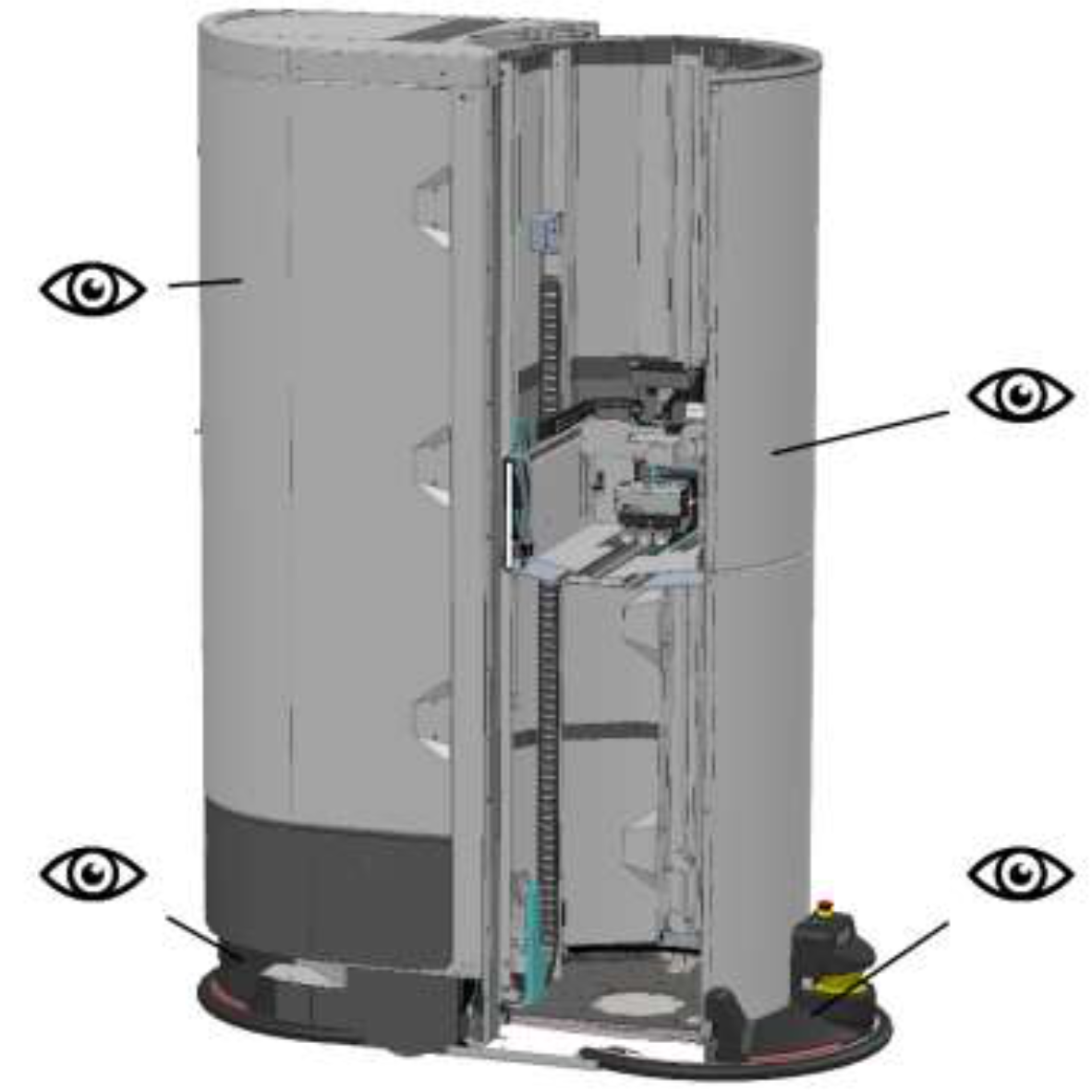
|
Pictogram |
Comment |
|---|---|
|
|
Check the LED strips for function and damage. Replace the complete LED strip, even if only individual LEDs are defective. |
|
Check all parts of the cover for damage and tight fit. |
|
|
Check the tower rotation for ease of movement. |
Please refer to the TORU Self-Service guide in the MAGAZINO documentation space for more detailed instructions and guides.
Testing the emergency stop button
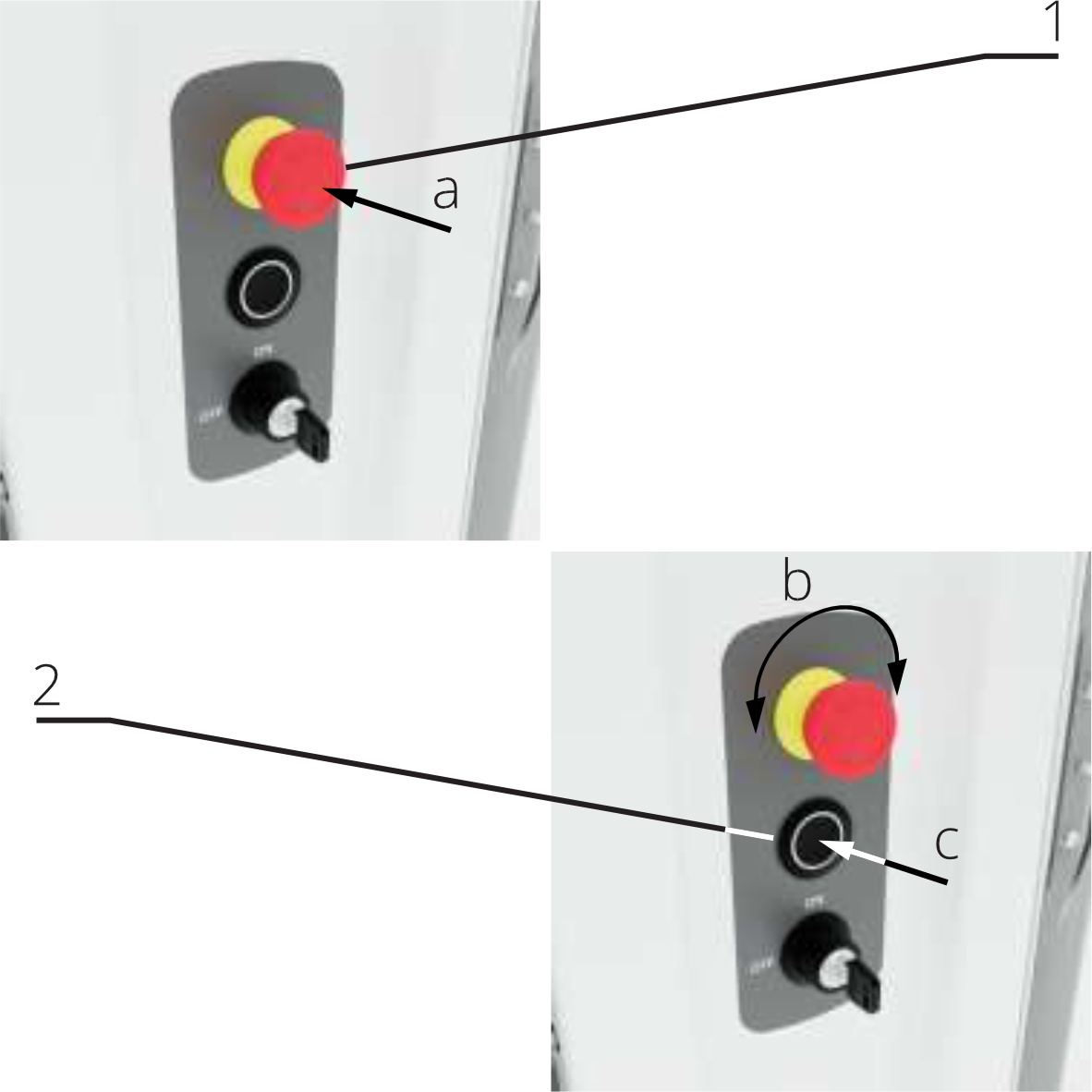
Emergency stop buttons must be checked regularly for function and damage.
|
|
Warning! Danger of accident! When operating with damaged emergency stop buttons, dangerous machine movements may not be stopped in time.
|
|---|
Execution:
-
Press the emergency stop button. The robot stops all dangerous movements.
-
Unlock the emergency stop button. The robot resumes its work.
Repeat the test for all emergency stop buttons.
Please refer to the TORU Self-Service guide in the MAGAZINO documentation space for more detailed instructions and guides.
Corrective maintenance
Corrective maintenance is non-cyclic work that is performed to ensure safe operation.
Trained personnel (maintenance personnel) can conduct certain repairs with the resources available in the documentation portal.
For other repairs, a skilled service technician (service personnel) needs to be commissioned.